Why Push-to-Talk Voice Comments Beat Typing in Video Review
Typing out video revisions is slow and ambiguous. Here is how holding ⌃+⌥ to speak while drawing on frames cuts creative review cycles by 70%.

In This Article
Video review has a fundamental friction point: creatives think in motion and sound, but traditional review tools force them to stop, type, and format text.
When an art director or client spots an issue at 01:24:18, they usually have to:
- Pause the video playback.
- Click the comment box.
- Type: "Can we please ease the scale-in on the hero graphic here and make sure the lower third stays until the voiceover finishes?"
- Re-read and fix typos to ensure the editor doesn't misunderstand.
This process takes 30 to 60 seconds per revision note. Across a 60-second commercial with 40 revision points, creative directors waste half an hour just typing.
The Push-to-Talk Solution
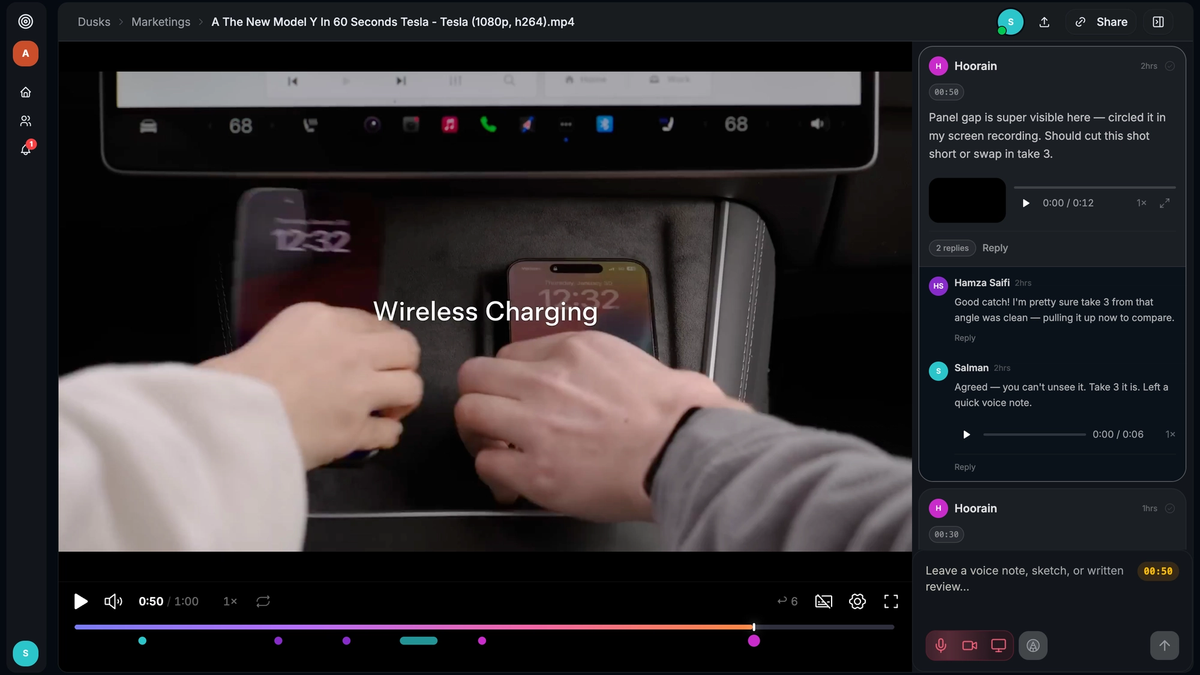
In Dusken, we introduced a faster way: Push-to-Talk Voice Comments (`⌃ + ⌥`).
Instead of typing, reviewers simply hold down ⌃ + ⌥ (Control + Option) on their keyboard:
- Speak naturally: Explain the exact creative nuance using natural inflection.
- Draw simultaneously: The canvas unlocks so you can circle, point, or sketch arrows while your voice is being recorded.
- Natural Spoken Timecodes: Say "from 12 seconds to 18 seconds" and Dusken automatically maps the comment across that exact timecode span.
"Speaking at 150 words per minute while drawing on the frame conveys more context in 5 seconds than a 3-paragraph written note ever could."
Accurate AI Transcription & Search
Audio alone isn't enough—editors need to scan notes quickly without listening to 50 separate voice clips.
Dusken runs Whisper speech-to-text models on every voice note:
- Generates frame-accurate transcripts instantly.
- Highlights action items and color-coded change tags.
- Allows team members to search video reviews by spoken keywords.
Direct Export to Premiere Pro & DaVinci Resolve
Voice notes and annotations don't stay trapped in the web browser. With Dusken's NLE export engine, editors can export all markers, transcripts, and drawing overlays directly into:
- Adobe Premiere Pro (EDL / XML markers)
- Blackmagic DaVinci Resolve (Timeline markers)
- Final Cut Pro (FCPXML)
Try Push-to-Talk on your next video review in Dusken.
Written by Salman Saifi
Founder & Engineer at Dusken
Founder and developer building Dusken. Focused on eliminating creative review friction with frame-accurate video markup, Push-to-Talk voice comments, and native NLE marker workflows.